Automatic request capture
The system creates a ticket from every communication channel — email, phone, form, portal, SMS. No request gets lost in an inbox.
Emails, calls, forms, SMS, customer portal, and API — all in one panel with automatic routing, SLA tracking, and full customer history.
Trusted by — among others
A modern ticketing system gathers every request — from email, phone, forms, customer portal, chat, and SMS — into one organized panel.
Your team works from a clear list of cases with priorities, statuses, and assigned owners. This makes it easier to meet SLAs, avoid email-inbox chaos, and deliver a more predictable customer experience.
The Debesis ticketing system guides every request through the entire process – from intake to final resolution.
Email, phone, form, or SMS. The system automatically creates a numbered ticket.
Rules automatically assign topic, priority, and tag — in 30 ms, with no manual sorting.
The algorithm picks the right agent based on workload, skills, and SLA.
The team resolves the case with full context (history, integrations, knowledge base).
Ticket closed, customer notified, data feeds SLA and CSAT reports.
Six modules that work together from day one. No setup, no developer, no consultant required.
The system creates a ticket from every communication channel — email, phone, form, portal, SMS. No request gets lost in an inbox.
Rules automatically assign category, topic, and urgency, so the system knows what to handle first.
Algorithms route cases to the right person or queue, taking into account request type, team availability, and SLA.
Ticket handovers, internal notes, merging requests, and escalations let the entire team work on one customer service system.
Monitor first response time, resolution time, agent workload, and SLA compliance in real time.
Connect the ticketing system with CRM, e-commerce, couriers, VoIP telephony, and the customer portal to have full context for every request in one place.
From the first request to a happy customer – three key steps you complete in a single tool.
Emails, calls, forms, SMS, customer portal, and API all flow into a single panel. No more scattered inboxes or lost messages.
Define categories, queues, SLAs, and rules for automatic ticket routing – the system makes sure nothing slips through.
return
Returns
4h
Your team works calmly through a clear list of cases, while you watch the results in SLA, KPI, and customer satisfaction reports.
Three real-world scenarios – calls, complaints, and SMS – showing how Debesis organizes day-to-day customer service.
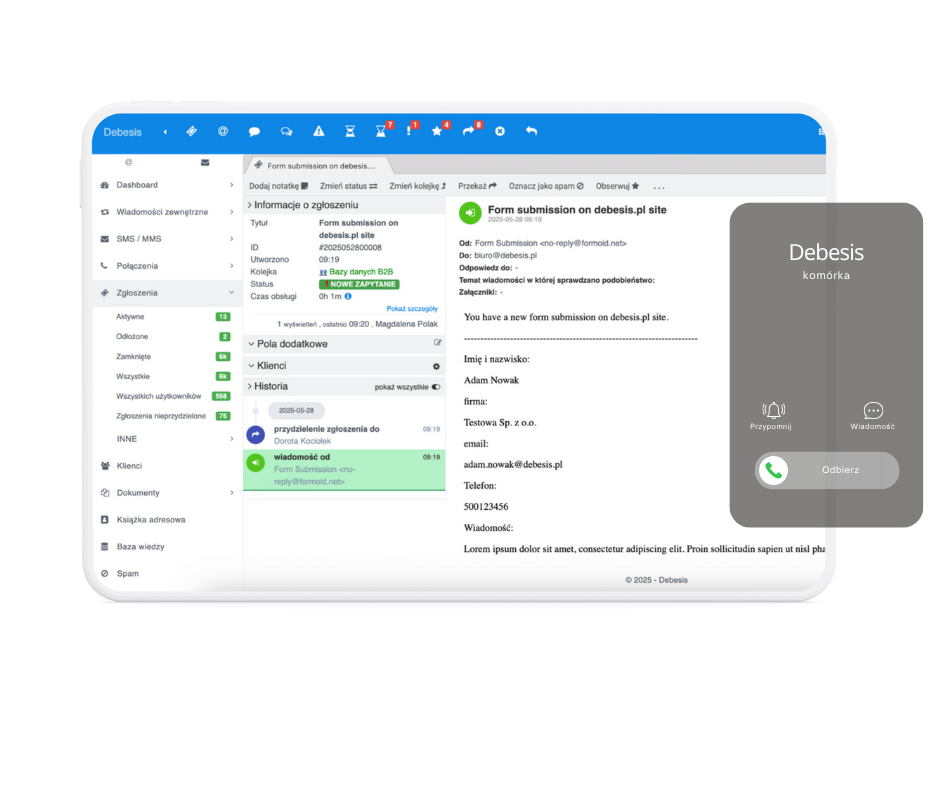
Every call is logged in the system as a ticket with conversation history and customer context.
See example →
The customer files a request themselves, tracks case status, and sees the next steps – without calling the hotline.
See example →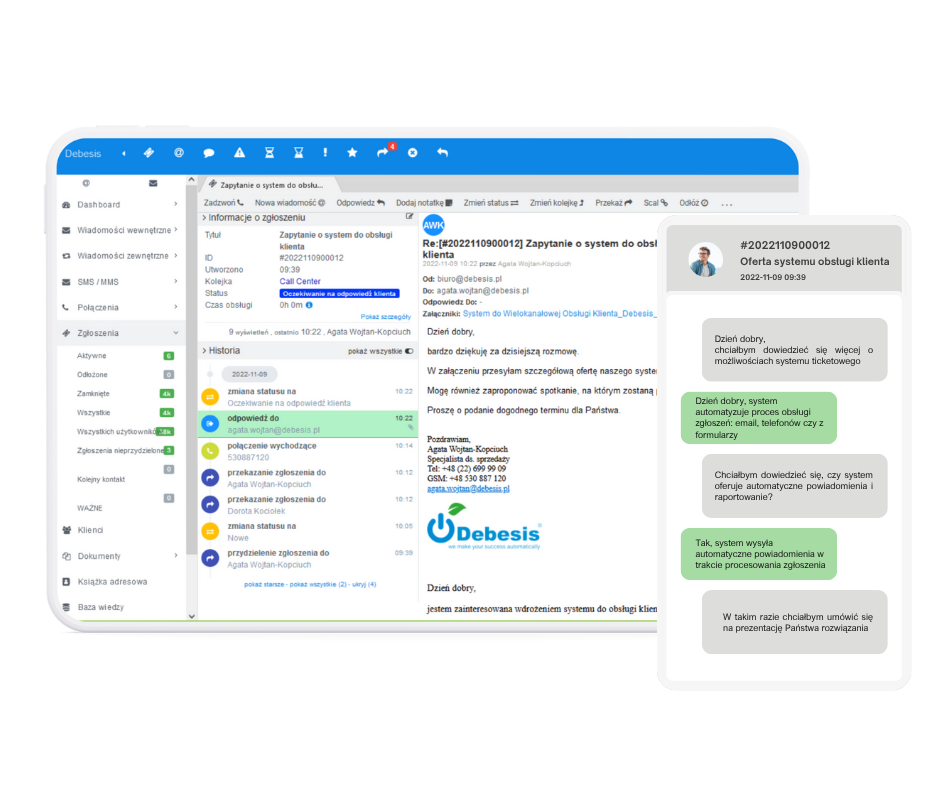
The system automatically sends SMS reminders to patients about their appointments and logs replies as tickets.
See example →
The modern Debesis ticketing system centralizes all customer communication – from phone calls, through emails, to forms and other request sources. Every call is automatically logged as a ticket, with the customer assigned, contact history attached, and full case context. The agent sees the request status, team notes, and previous interactions on a single screen, which speeds up problem resolution. Customer service automation eliminates manual data re-entry, reduces errors, and ensures no request "disappears" in an inbox.
The Debesis customer portal changes how companies handle complaints and ongoing requests. Customers log in to their dashboard, can file a case themselves, attach photos, documents, and comments, and then track every step of the process. From within the ticketing system, agents see all the information, contact history, and statuses of related requests, which speeds up decisions and answers to customer questions. Process transparency cuts down on "what's the status of my complaint?" inquiries and takes the load off the customer service team.
With built-in SMS messaging, the Debesis ticketing system works great in healthcare, beauty, and service industries. The system automatically sends appointment reminders, notifies about schedule changes, confirms request receipt, or shares case status during the customer service process. Every message is linked to a specific ticket, so the team has a full picture of communication with the patient or customer – from SMS, through email, to internal notes. Customer service automation reduces the number of no-shows, takes the load off the front desk, and lets the team focus on what really matters: the quality of services delivered.
In practice, a single ticketing system handles a range of processes: requests, complaints, inquiries, and notifications. The key is a consistent process, priorities, SLAs, and integrations with the tools you already use.
Collect requests from emails, forms, and marketplaces in one place. Connect ticketing with orders and logistics through integrations, and give customers self-service through the Customer Portal.
Automate confirmations and reminders, keep contact organized in a single case thread, and measure efficiency. Find more automation in features.
Set priorities, roles, and responsibilities, and keep contact history attached to each request. That makes it easier to control quality and reduces time to resolution (TTR).
Combine calls, emails, and forms in one panel. Ensure SLAs, queues, and real-time status visibility – with no "lost cases".
The most common questions about how a ticketing system works in practice: from contact channels, through SLAs, to the customer portal.
Debesis is a ticketing system that turns scattered communication into one clear customer service and complaints platform.
Instead of wasting time looking for emails, notes, and statuses across multiple apps, your team works in a single ticketing system. Automated request workflows, smart prioritization rules, and integrations with CRM, e-commerce, and shipping carriers help you respond to customer needs faster, shorten handling time, and meaningfully raise satisfaction levels. All this with full SLA control and key KPIs for the customer service department. Companies choose Debesis not just for its ticketing system features, but also for data security, implementation support, and a flexible cooperation model and pricing.
Debesis doesn't work in isolation from your tools. The ticketing system integrates with CRM, e-commerce, shipping carriers, the customer portal, and VoIP telephony, so agents see the full context of a request in a single panel: order history, shipment status, customer contact, and team notes.
Companies in healthcare, finance, e-commerce, and services improve their customer service with our solutions. Debesis ticketing system reviews confirm the effectiveness of our implementations in practice.
Debesis provided a stable working environment for our Monitoring Center. Higher efficiency helped us meet company goals without having to grow headcount. Smooth data flow between the Debesis solution and external systems cut patient handling time. The system's multichannel capabilities and integration of several systems let us shift most of the inefficient yet necessary tasks from the employee to the system. Debesis turned out to be a trusted partner in achieving this goal.
Debesis takes a professional approach to customers, offering high standards across its solutions. The company is highly flexible and responds quickly to issues raised. Services are delivered on time using the latest standards in the IT industry. A partner well worth recommending!
High-quality customer service has a major impact on how a business operates and grows. Implementing the solutions Debesis proposed was one of the key decisions for our customer service, which is why we can wholeheartedly recommend Debesis as a reliable partner.
Implementing the ticketing system was a milestone for our customer service. We eliminated a ton of mistakes, used IVR to train staff on guest conversations, and cut nearly 70% of phone calls to the restaurant. Advanced email handling makes sure no message goes unnoticed. I recommend Debesis for its helpful and fast technical support.
As the company grew, our staff couldn't keep up with customer inquiries. Thanks to the features in the Ticketing System, Roneberg can now handle requests in an organized way. Centralized service, faster response times, access from anywhere, and detailed customer contact history are the main outcomes of the implementation.
Today, alongside professional services, price, and timeliness, the quality of patient care determines a company's competitiveness. Implementing the Debesis hotline management system helped us raise that quality.